

If you’ve ever stared at a QuickBooks P&L and thought, “I wish I could see this by location, project type, and department at the same time,” you’ve run into the limits of Classes.
Classes are better than nothing. They give you a single extra way to segment your data. But they’re still just one dimension, and construction companies don’t run on one-dimensional data.
Classes are linear: every line gets one label. The minute you care about project, department, and region at the same time, you hit the ceiling.
Intuit Enterprise Suite (IES) introduces Dimensions: multiple tracking fields you can layer onto each transaction line. That shift from “flat” to multi-dimensional data changes how you slice your P&L, analyze job costs, and roll up multi-entity results.
This article breaks down how Classes and Dimensions really work, where each fits, and what changes when you move from single-tag to multi-dimensional reporting.
Featured Answer
QuickBooks Classes give you one tracking dimension, while Intuit Enterprise Suite lets you use up to 20 custom dimensions, so every transaction can be tagged by project, location, cost category, department, and more for true multi-dimensional reporting.
TL;DR
- In QuickBooks Online, Classes are a single analysis dimension. You can build subclasses under them, but every line still gets just one Class tree.
- In Intuit Enterprise Suite (IES), you can define up to 20 separate dimensions, each with its own hierarchy of “subdimensions,” and tag the same transaction line with several at once.
- Both Classes and Dimensions can default from products/services, but a lot of coding is still manual. You’ll rely on tools like Reclassify Transactions, Spreadsheet Sync, and clear policies to keep data clean.
- AI “agents” in IES can help propose dimension coding, but you need tight rules and review so automation doesn’t quietly corrupt your structure.
- Dimensions can be shared across IES entities and used in consolidated reporting, which is a huge leap forward for multi-entity construction groups.
Classes in QuickBooks: One Dimension With Subclasses
Think of a Class in QuickBooks Online as a single analysis dimension. It’s one extra label you attach to transactions or lines so you can run a “P&L by Class” or filter reports by that label.
Most companies use Classes to represent things like:
- Location or region
- Division or department
- Line of business
- Job type (service vs construction, TI vs ground-up)
You can also create subclasses, building a hierarchy:
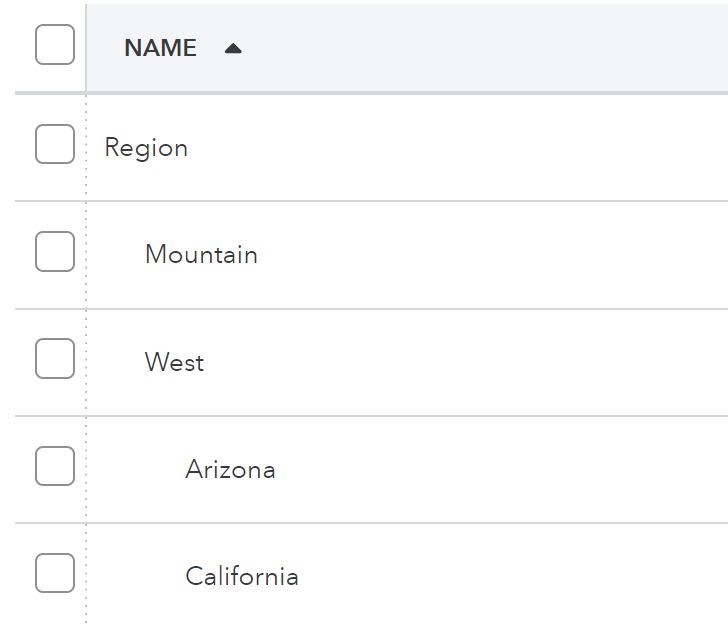
On reports, you can roll up to the parent (“West”) or drill into the leaves (“Phoenix”). That gives you more structure, but it’s still all contained inside one Class dimension. Every line gets one Class value at one point in that tree.
Where Classes Show Up
You can apply Classes:
- On invoice lines or at the invoice header
- On bill lines or at the bill header
- On journal entry lines
- On timesheets and payroll to track labor by Class
You can also set default Classes at the product/service level, so when you use that item, QuickBooks suggests the Class automatically. That helps, but it doesn’t cover every scenario.
Fixing Mistakes: Reclassify Transactions
If you mis-code Classes (and you will), QuickBooks gives you the Reclassify Transactions tool (in Accountant/Advanced editions). It lets you:
- Filter a group of transactions
- Change their Class, account, or location in bulk
- Clean up large chunks of bad coding without editing each transaction one by one
It’s not glamorous, but it’s essential once your Class structure gets busy.
What Are Dimensions in Intuit Enterprise Suite?
Now imagine taking that Class concept and multiplying it.
In IES, you can define up to 20 different dimensions, each representing a separate way you want to look at your business, for example:
- Department
- Location
- Project / Job
- Project Phase
- Cost Category
- Crew or Superintendent
- Revenue Stream or Service Line
- Region
Dimensions only deliver value when they’re designed and coded consistently. Our role is to create a structure that reflects how a construction business actually operates—so reporting is accurate, repeatable, and aligned with real-world decision-making.”
- Neil Tagawa, RedHammer Partner
Each dimension has its own list of values, and you can also design subdimensions (hierarchies) inside each one, similar to subclasses in QuickBooks, but now spread across multiple dimensions instead of jammed into one.
A single AP line in IES might be tagged like this:
- Department: Operations
- Location: Phoenix
- Project: TI – Midtown Office
- Cost Category: Subcontractor
- Phase: Rough-In
Same dollars, five tags. That’s the core difference.
From Flat to Dimensional: How It Changes Your P&L
QuickBooks Classes give you a flat view: you pick one Class dimension and compare it across columns.

Dimensions in IES turn your P&L into something closer to a data cube:
- Profitability by location and project type
- Overhead allocation by department across all projects
- Job margins by superintendent across multiple cities
- Performance by region, division, and service line using the same set of numbers
“Multi-dimensional accounting provides a unified, centralized framework for financial data… Instead of being confined to a basic chart of accounts, it allows CFOs and their teams to analyze financial information across an unlimited number of dimensions simultaneously.”
- Abigail Sims, What is multidimensional accounting? How to use it + why you need it
You’re not changing the underlying dollars; you’re changing the number of ways you can slice, pivot, and interpret those dollars.
For construction, that means you can ask questions like:
- “Which project types are most profitable in Phoenix vs Denver?”
- “Which superintendents consistently deliver higher job margins?”
- “How does TI work perform across all entities, not just one?”
Dimensional data turns your P&L into an analysis tool instead of a static report.
Classes vs. Dimensions in Day-to-Day Use
Here’s how Classes and Dimensions compare when you’re actually entering and reporting on data.
Subclasses vs. Subdimensions: Hierarchy Without the Headache
Both systems support hierarchy:
- Subclasses in QuickBooks let you build a tree under the one Class dimension.
- Subdimensions in IES let you build trees inside each dimension.
The big difference is where the hierarchy lives:
- In QBO, you’re trying to cram region, city, and maybe job type into one Class structure.
- In IES, you break that out:

This avoids “monster Class lists” and makes it easier to change one dimension (say locations) without blowing up everything else.
Dimensional Forecasting: Taking Dimensions Into the Future
Dimensions aren’t just for reporting where you’ve been. In Intuit Enterprise Suite, they power forward-looking forecasts so you can see where the business is headed by department, region, project type, or any other dimension you’ve designed.
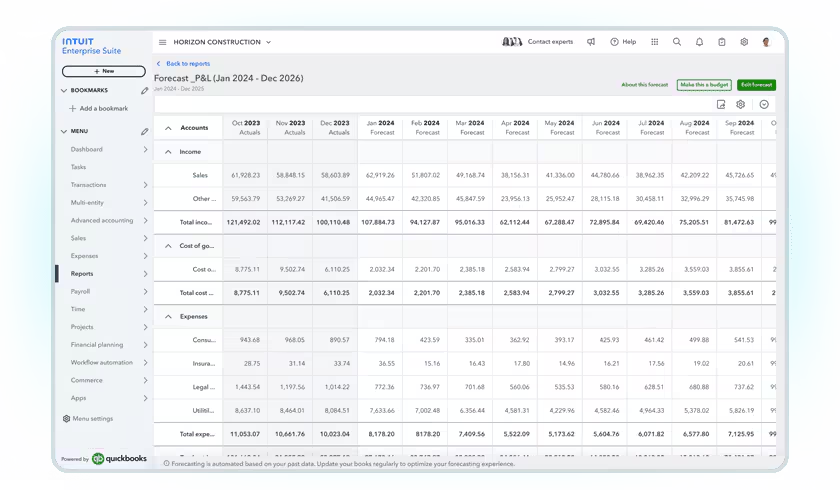
IES’s business forecasting tools let you analyze projected revenue and expenses using your custom dimensions, so you’re not stuck with a single, top-level P&L forecast. You can break forecasts down by department, region, program, fund, product line, or other dimensions that matter to your business and evaluate profitability at that level.
Behind the scenes, IES uses AI-driven FP&A to generate forecasts based on your historical performance. You can feed in your existing budget or automatically build forecasts from the last 3, 6, 9, or 12 months of results, extending projections out as far as three years. For more mature environments, you can even leverage up to five years of history to establish baselines and trend lines.
For construction companies, this means you can forecast:
- Revenue and gross margin by project type and region
- Overhead by department across all entities
- Cash flow impact of certain project mixes or backlog profiles
- Profitability by division, superintendent, or cost category
Once you’ve built a dimensional forecast, you can convert it directly into a dimensional budget or export it to Excel or PDF for further modeling and board packages.
The key is that forecasting stays aligned with your dimensional model. The same dimensions you use for day-to-day coding and reporting become the levers you pull when you run scenarios, set targets, and decide which projects or regions deserve the next round of investment.
Manual Coding, Defaults & Reclassification
Here’s the honest truth: neither system is magical. Classes and Dimensions both require coding discipline.
Defaults Help, But They Don’t Do Everything
You can tilt the odds in your favor by using defaults:
- In QuickBooks, you can assign a default Class at the product/service level.
- In IES, you can assign default dimensions to items and other records so the right tags appear automatically when you use them.
That cuts down on the number of times someone has to manually pick a Class or dimension, but you’ll still have plenty of transactions that need explicit coding decisions.
Fixing Bad Coding After the Fact
This is where tooling matters:
- In QBO, the Reclassify Transactions tool lets you repair bad Class coding at scale.
- In IES, Spreadsheet Sync and dimension reclass tools let you export, correct, and push dimension changes back in bulk.
So even if your team gets it wrong early on, you’re not permanently stuck with messy reporting, as long as you’re willing to review and clean up periodically.
AI Agents & Automation: Helpful, But Handle With Care
One of the shiny things in IES is the use of AI “agents” to help with coding:
- They can suggest dimensions based on past behavior, vendor history, project patterns, and other signals.
- Over time, they can reduce the amount of manual dimension selection and data entry.
That’s powerful, but it comes with a warning label:
- If your early coding is inconsistent, the agents will learn those bad habits.
- If nobody reviews suggestions, small mistakes can quietly propagate across hundreds of transactions.
- If you change your dimension design but don’t retrain your habits, the agents may keep nudging toward the old structure.
Treat AI suggestions like a smart junior team member: incredibly helpful, but not something you let run completely unchecked.
Dimension Governance: Policies, Not Just Features
The feature set is great, but the success or failure of Dimensions comes down to governance.
When you move to IES, you should have:
- A documented dimension design
- Which dimensions exist
- What each one means
- Where they’re required (which forms, which lines)
- Coding rules for each role
- AP: which dimensions must be set on a bill line
- AR: which dimensions must be set on an invoice line
- Payroll: how labor must be tagged (project, phase, cost category, etc.)
- Consistency across entities
- Shared dimension lists where appropriate
- Clear process for adding new values so naming stays consistent
- Regular review and clean-up
- Run reports for “Not specified” or blank dimension values
- Use Spreadsheet Sync or reclass tools to fix issues in batches
- Periodically validate that AI-assisted coding is still aligned with your rules
Without governance, Dimensions just give you more ways to be inconsistent. With governance, they become one of the most powerful tools in your financial stack.
Dimensions in a Multi-Entity World
QuickBooks Online is fundamentally single-entity. Each file has its own Classes and chart of accounts. You can mimic multi-entity, but consolidated reporting is largely a manual, Excel-driven process.
IES, on the other hand, is built for multi-entity groups:
- You can maintain a shared chart of accounts across entities.
- You can maintain shared dimensions and subdimensions, so “West Region,” “TI,” or “Service” mean the same thing everywhere.
- You can run consolidated P&L and balance sheet with dimensional detail:
- P&L by region across all entities
- Job-type profitability across the group
- Overhead by department at the consolidated level
This is where dimensions really shine for construction holding companies or groups with separate legal entities but a shared management team.
Designing Dimensions for a Construction Company
If you’re a contractor thinking of making the leap, here’s a simple starting pattern for dimension design:
Start with 5–7 core dimensions:
- Project / Job
- Project Phase (Precon, Rough-In, Finish, etc.)
- Cost Category (Labor, Materials, Subcontract, Equipment, Other)
- Location (Region → City)
- Department (Operations, Service, Admin, etc.)
- Revenue Stream (Construction, Service, Maintenance)
- Superintendent or Project Manager
Avoid common traps:
- Don’t duplicate the same concept in multiple places (e.g., putting cost category in both the chart of accounts and a dimension and your cost code structure).
- Don’t create dimensions “just in case” you might use them.
- Don’t change the meaning of a dimension mid-year; add new values or dimensions rather than repurposing old ones.
Decide what’s required:
For example, you might require every job-costable line to have:
- Project
- Phase
- Cost Category
- Location
When everyone knows the rules, it’s easier to code correctly and easier to catch exceptions during review.
What RedHammer Would Like to See Next in IES Dimensions
Even though Dimensions are a major leap forward, there are a few enhancements that would push them even further for construction companies:
1. Dimensions on the Balance Sheet
Being able to tag balance-sheet accounts (AR, AP, retainage, WIP, equipment assets, intercompany) with dimensions would unlock:
- AR by project or region
- AP by division
- Retainage by job
- Working capital visibility by entity or cost center
It would also simplify construction WIP, bonding reports, and bank packages.
2. Default Dimensions Beyond Items
Right now, defaults at the product/service level help.
But adding defaults at:
- Vendor (e.g., subcontractor = default cost category)
- Customer/Project (e.g., job inherits region + project type)
- Employee (e.g., crew or superintendent defaults)
…would dramatically improve accuracy and reduce manual coding.
3. Dimension Relationship Rules
Having “if X then Y” rules (e.g., if project = TI, cost categories = these values only) would improve data consistency and reduce invalid combinations.
FAQs
Q. Is a Class basically a single dimension?
A. Yes. A Class in QuickBooks is effectively a single analysis dimension with a tree of subclasses under it. You can use that dimension however you want (location, department, etc.), but each line still gets just one Class.
Q. How many dimensions can I have in IES?
A. IES supports up to 20 custom dimensions. You don’t have to use all of them, but the capacity is there if your reporting needs are complex.
Q. What’s the difference between subclasses and subdimensions?
A. Subclasses are hierarchical values inside the single Class dimension in QBO. Subdimensions are hierarchical values inside each separate dimension in IES. The big difference is that IES lets you have many dimensions, each with its own hierarchy.
Q. Can Classes and Dimensions default automatically?
A. Yes, to a point. Both systems let you default Class or dimension values at the product/service level (and in IES, on other records too). That reduces manual coding but doesn’t eliminate the need for intentional tagging and review.
Q. How do I fix bad Class or Dimension coding?
A. In QBO, you use the Reclassify Transactions tool to bulk adjust Classes (and accounts/locations). In IES, you use Spreadsheet Sync and dimension reclass tools to export, correct, and push dimension changes back to the system.
Q. How do Dimensions help with multi-entity consolidation?
A. Because dimensions and the chart of accounts can be shared across entities in IES, you get consistent tagging. That means consolidated reports can show results by region, project type, department, and more across the entire group, not just per company.
Q. Are Dimensions worth the extra complexity?
A. If you’re small and simple, Classes might be enough. Once you’re managing serious job costing, multiple locations, or multiple entities, the ability to analyze the same dollars through multiple lenses is usually worth the design effort and governance.
What RedHammer Can Do for You
At RedHammer, we help construction companies implement Dimensions the right way—clean, consistent, and built to scale. Here’s how we support you at every step:
- Dimensional Design & Strategy: We define the right dimension structure for your business, including hierarchies, naming conventions, and required fields for project, phase, cost category, location, and department.
- Data Cleanup & Migration: We map existing classes, cost codes, items, vendors, and project data so everything flows cleanly into your new dimensional model without clutter or duplication.
- Governance & Coding Standards: We build the rules your team will follow—what gets coded, where, and by whom—so dimensions stay consistent across AP, AR, payroll, equipment, and intercompany activity.
- Multi-Entity Setup & Consolidation: We design shared charts of accounts and shared dimension structures so your entities report the same way and consolidated statements can break down results by region, division, or project type.
- Training & Ongoing Support: We train your teams on coding, review, and reclassification. Then we stay with you to maintain the structure, adjust dimensions as you grow, and keep reporting aligned with how your business operates.
Whether you’re upgrading from QBO or restructuring your current IES setup, we’ll design the model, implement it, and keep it running smoothly so you get cleaner data, deeper visibility, and faster decisions.
Conclusion
QuickBooks Classes are a great introduction to segmented reporting. They let you move beyond a single, monolithic P&L and start viewing results by one key dimension.
But they’re still just that: one dimension.
Intuit Enterprise Suite’s Dimensions take that idea and expand it into a full multi-dimensional model. You go from a flat view of your business to a cube you can slice by project, phase, cost category, department, location, and more. For construction and multi-entity groups, that’s often the difference between “we have numbers” and “we truly understand what’s going on.”
The trade-off is that Dimensions demand more design, more discipline, and better governance. If you’re ready for that step, the payoff is a cleaner chart of accounts, more reliable job costing, and far more meaningful P&Ls and consolidated reports.
If you’re starting to feel the ceiling of Classes and want to see what a dimensional structure could look like for your construction business, it’s probably time to talk seriously about IES.



.png)


