

The Winter 2026 release of Intuit Enterprise Suite is the most construction-focused update Intuit has shipped to date. For the strategic context behind this release, including what it signals about Intuit’s mid-market strategy, where IES stands competitively, and who should pay attention, see our companion article: Intuit Enterprise Suite: Construction Edition Is Finally Here. For a comprehensive overview of the entire IES platform and how it serves construction, see The Complete Guide to (IES) Intuit Enterprise Suite for Construction Companies.
This article is the detailed technical reference. It covers every feature in the Winter 2026 release, organized by category, with construction relevance called out throughout.
TL;DR
- Construction beta launches with project phases, cost groups, AIA-style invoicing, proposals with e-signatures, negative change orders, and enhanced project budgets, available to all IES customers at no additional cost (for now). Also available as a paid add-on for QBO Advanced.
- Multi-entity reporting adds five new consolidated reports for better cross-entity visibility.
- Workflow automation gets parallel approvals (up to 5 approvers), detailed audit trails, and dimension-based routing.
- AI enhancements include multi-entity Finance Agent summaries, batch bank feed processing with Accounting Agent, and an expanded Sales Tax Agent with filing pre-check.
- Inventory adds item receipts, Moving Average Cost valuations for Desktop migrations, and enhanced sales orders.
- Business intelligence delivers improved report views, calculated fields, management report sharing, new app integrations (HubSpot, Salesforce, Gusto, Hubstaff, Clockify), and expanded custom KPIs and dashboards.
- Dimension assignment is faster with bulk assignment and new access points.
- Workforce management adds garnishment lifecycle tracking, consolidated employee lists, and simplified time assignments.
IES for Construction (Beta): From Bid to Project Close
Construction businesses can now use Intuit Enterprise Suite to manage projects end-to-end, from winning bids through project planning and execution to project close, with AI automating steps along the way. Home, Reports, and Dashboards surface the most industry-relevant information, bringing project operations and finances under one roof.
These features are available in open beta to all IES customers at no additional cost today, though Intuit notes pricing may change. Also available as a paid add-on for QuickBooks Online Advanced customers.
Project Phases
Define project phases directly inside IES and use them to structure budgets and estimates. Phases can be added at both the project and budget level, giving you layered control over how work is organized and tracked. Stay on top of cash flow, profitability, and effective project management in one place by planning and tracking your budget and progress against project phases. Project Management AI recommends phases when you upload contracts, client communications, or scope documents to a new project.
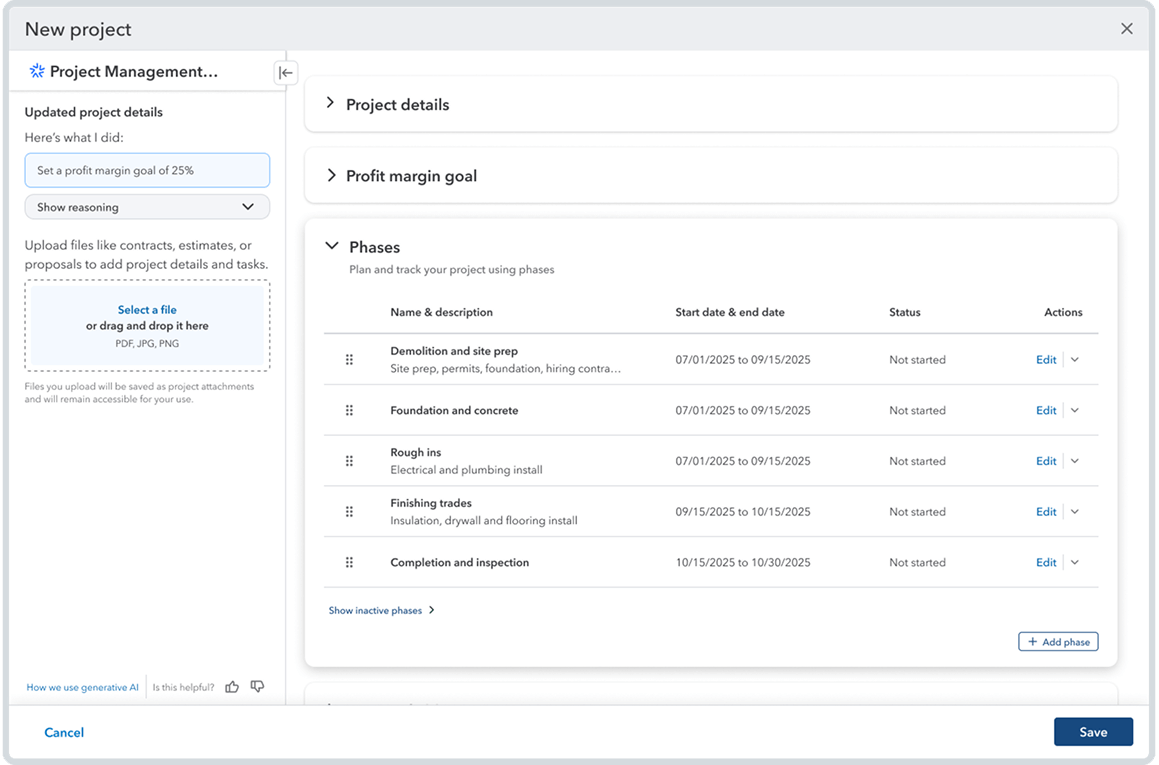
The real power of project phases is in how they connect your internal cost detail to your external billing. Phases let you group individual cost codes (products and services) into a single billable bucket or AIA line item. This means you can budget and track costs at a granular level internally while presenting a cleaner, rolled-up view to the customer on estimates and invoices. That connection creates rollup behavior across transactions and reports, so your detailed job cost data feeds directly into your billing documents without manual reconciliation.
If you have used project management platforms like Procore, this concept will feel familiar. The difference is that IES builds it directly into the accounting system, so there is no sync, no middleware, and no disconnect between what your PMs are tracking and what your accounting team is billing.
Why this matters for contractors:
- Group cost codes into billable phases that map to your AIA schedule of values
- Budget at a level of detail that stays hidden from the customer on estimates and invoices
- Rollup behavior flows through transactions and reports, eliminating manual consolidation
- Compare planned vs actual progress by phase without leaving IES
- AI-suggested phases accelerate project setup for PMs managing multiple jobs
Cost Groups
Plan and track project costs for better job costing and project profitability tracking by designating industry-standard cost groups in your list of products and services (labor, materials, equipment, subcontractor, miscellaneous) and tracking cost groups across budgets, expenses, POs, and bills. Filter reports by cost group to compare estimated vs actual costs.
Construction angle:
- Align IES cost tracking with how you actually estimate and bid work
- Filter project cost reports by cost group to spot overruns at the right level of detail
- Eliminate spreadsheet workarounds for breaking costs into meaningful categories
Where we would like to see this go:
Cost groups are a solid foundation, but construction companies need the ability to drive accounting by a user's choice of cost code (product) and cost group together. Right now, cost groups categorize at a high level. The next step is letting contractors use the combination of cost code and cost group to control how costs post, how they roll up in reports, and how they map to job cost structures. We have shared this feedback with Intuit and expect this to evolve in future releases.
Project Budgets Enhancements
Project budgets got a significant upgrade in this release. The changes touch setup, real-time visibility, reporting, and migration, making budgets a more useful operational tool rather than just a planning artifact.
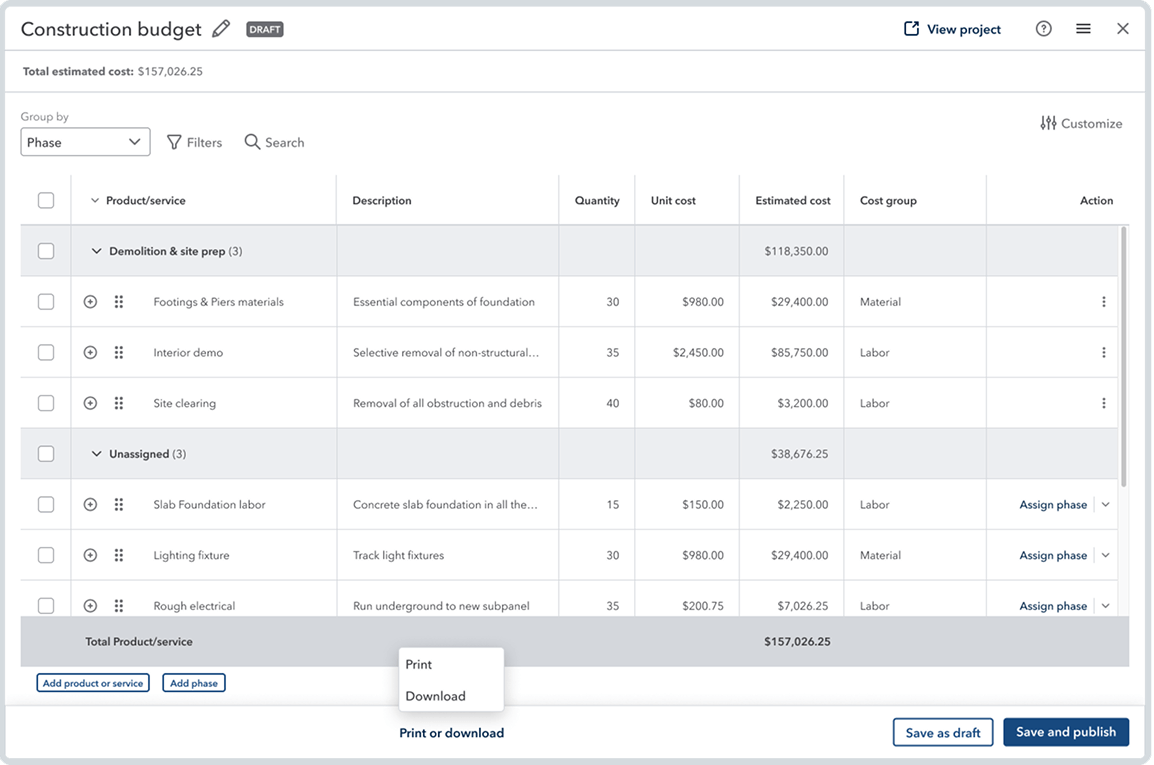
What changed:
- Simplified setup: Budget creation is streamlined with fewer steps to get a working budget in place. Less time configuring, more time managing.
- Phase-level tracking: Budgets now track variances by phase, so you can see where you are over or under at the level that matches your project structure and your AIA billing.
- Real-time overrun alerts: AI-powered insights surface budget overruns in the project summary dashboard as they happen, not after the fact at month-end.
- Export and print: Budgets can be exported or printed for internal reviews, owner meetings, and surety reporting.
- Version comparison: Compare budget versions across all project cost reports. Useful for tracking how scope changes and change orders have affected your original budget over the life of a project.
Migration note:
Businesses migrating from QuickBooks Advanced or Desktop get project budgets automatically created during migration with existing cost data carried over. This is a meaningful improvement. In previous releases, budget data had to be rebuilt manually after migration, which added days to implementation timelines and created opportunities for errors.
Proposals
To help your business win more bids, create proposals from estimates (or vice versa), or build a customized proposal document with integrated e-signatures using a proposal document builder. Your customer can sign documents, make deposits, and review their project's scope and approved costs from a client portal.
For contractors:
- Professional branded proposals that compete with dedicated bid management tools
- Connected workflow from proposal to estimate to project to invoice
- Client portal reduces back-and-forth on signatures, deposits, and scope confirmations
RedHammer's take:
This is a good start, but the proposal builder needs quite a bit of work before most construction companies will adopt it as their primary tool. The formatting options, template flexibility, and level of customization are not yet where they need to be for contractors who are sending proposals that compete for six- and seven-figure jobs. We expect Intuit to iterate on this quickly.
Negative Change Orders
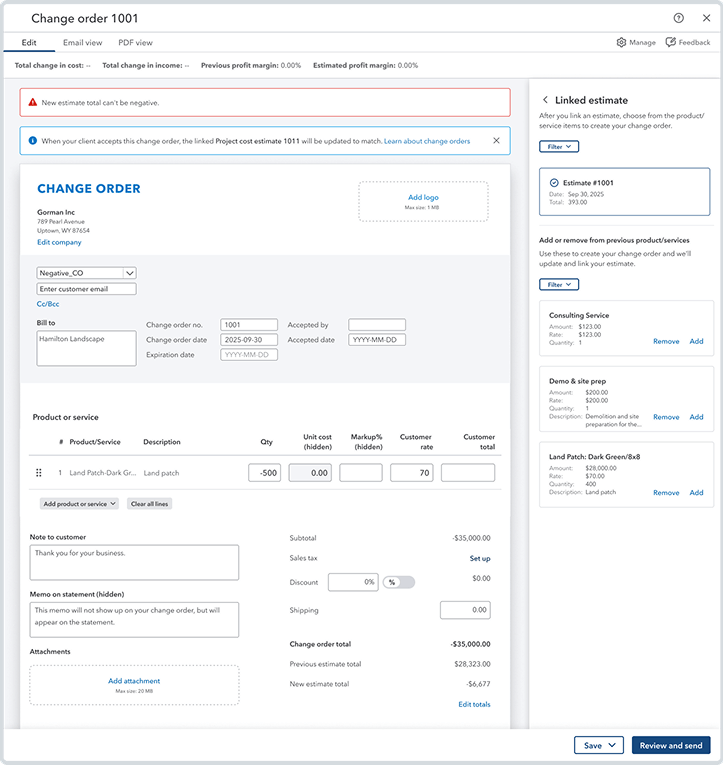
This one is personal for us. RedHammer has been asking Intuit for negative change order support for six months, and it is here.
What you can do now:
- Create negative change orders for price adjustments and scope reductions
- Add or remove products/services within the same change order
- Manage multiple change orders as long as your estimate total stays above zero
- Estimate income adjusts automatically when negative change orders are accepted
Without this, accounting teams were handling scope reductions offline or creating workaround entries, which broke audit trails and made project profitability reports unreliable. That gap is now closed.
AIA-Style Invoicing
This is one of the features we are most excited about at RedHammer. AIA-style progress billing is table stakes for commercial construction, and it now lives natively inside the accounting system.
What it tracks:
- Total contract value on estimate
- Invoiced to date with running totals
- Current draw amount
- Remaining balance at the phase level
- Each invoice builds on the last, eliminating manual schedule of values spreadsheets
- Available in the client portal and as invoice PDFs
This is a great start, and we are looking forward to seeing how Intuit expands AIA invoicing in the next release. There is room to go deeper on retention handling, conditional line items, and stored materials, but the foundation is solid.
What RedHammer Wants to See in Future Releases
The construction beta is a meaningful first step, but there are capabilities that mid-market contractors need before IES can fully replace dedicated construction platforms. Here is what RedHammer is advocating for:
- Change orders at the budget level: Not just at the estimate level, so budget-to-actual tracking reflects approved scope changes in real time.
- Defaults for dimensional data: At the customer, project, and vendor level, reducing manual entry and ensuring consistent tagging across transactions.
- Drive accounting with products and cost groups: Giving contractors control over how costs post and roll up based on both cost code and cost group.
- A real WIP (Work in Progress) report: With over/under billings, the single most important report in construction accounting and currently absent from IES.
- AR and AP retention tracking: Built into the platform, eliminating the manual retention schedules that every construction accounting team maintains today.
- G702 and G703 AIA billing forms: The industry-standard documents that owners, GCs, and lenders expect to see on every progress billing application.
Modernized Business Intelligence
As organizations grow across entities and systems, finance leaders spend more time reconciling numbers than acting on them. These enhancements move finance teams from manual consolidation to decision-grade visibility without needing to export to spreadsheets or third-party BI tools.
Improved Modern Report View
Now the standard for all reports. Automatic refresh, consistent customizations when drilling into details, GAAP-aligned account ordering, aging bucket drill-downs, zero-balance visibility, and inactive accounts hidden by default. Quicker access to insights with more streamlined and accessible customization.
Calculated Fields
Create custom formulas and perform calculations on top of existing report data, save your report, and come back to it anytime. Margin percentages, financial ratios, and other calculations without exporting to Excel or tedious spreadsheet workarounds.
Management Reports
Simplify customizing and sharing company-level and multi-entity management reports with more KPIs and custom metrics. Add KPI widgets and charts in Consolidated view, use smart chips to automatically update dates and figures throughout a report, new branding and formatting options, and delegation of access to non-admin users. Email sharing as PDF.
More App Integrations
In one place, analyze key business and financial metrics from multiple systems and see how everything fits together without manual work. New advanced integrations: CRM (HubSpot, Salesforce) and Workforce (Gusto, Hubstaff, Clockify). Third-party data flows into IES to power KPIs and dashboards with richer cross-system insights.
KPIs and Dashboards
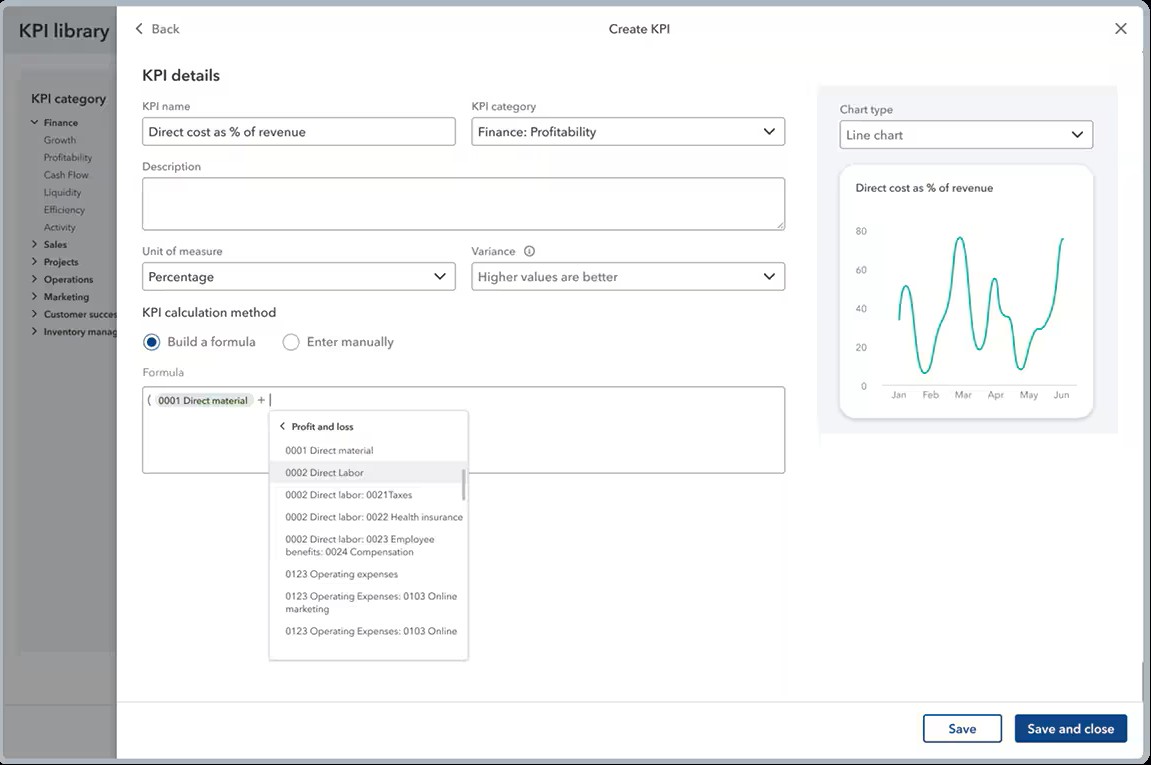
Expanded KPIs and dashboards allow you to track metrics using accounts from your Chart of Accounts as variables, specify a time period for each metric, and pull in variables from third-party data. Custom KPIs in management reports and dashboards. New pre-built dashboards for sales performance, payroll, and time tracking. Period-over-period comparison in dashboard charts.
Multi-Entity Financial Management
Multi-entity contractors know the pain of switching between company files to pull the same report across different entities. This release adds five new consolidated reports that let you see cross-entity transaction data from a single view, without logging in and out of individual companies.

New consolidated reports:
Invoice list: See all outstanding and paid invoices across every entity in one view. For contractors running multiple companies under one umbrella, this means one place to check AR status instead of opening each entity separately.
Transaction list by date: Pull every transaction across all entities for a given date range. Useful during month-end close when you need to verify that all entries posted correctly across companies, or when responding to auditor requests that span multiple entities.
Transaction detail by account: Drill into a specific account and see the activity across all entities. If you want to see what hit your materials expense account across three companies last month, you can do it in one report instead of three.
Deposit detail: Consolidated view of all deposits across entities. Helpful for cash management and reconciling bank activity when multiple companies deposit into shared or related accounts.
Check detail: See all checks written across entities in one place. For contractors managing AP across multiple companies, this simplifies payment tracking and makes it easier to answer vendor inquiries without hunting through individual entity records.
The Construction Angle
Most mid-market contractors we work with operate two to five entities, sometimes more. A typical structure might include a GC entity, a development entity, an equipment company, and a property holding company. Before this release, pulling a consolidated transaction report meant running the same report in each entity and combining them manually.
These five reports eliminate that workflow for the most common transaction-level views. Combined with the existing consolidated P&L, Balance Sheet, and Trial Balance, IES now covers the majority of multi-entity reporting needs without leaving the platform.
Workflow Automation Enhancements
As approval chains grow more complex, the risk is not just delays. It is also inconsistent enforcement and audit exposure. These enhancements allow workflows to scale across the organization while maintaining fidelity to established controls and policies.
Parallel Approvals
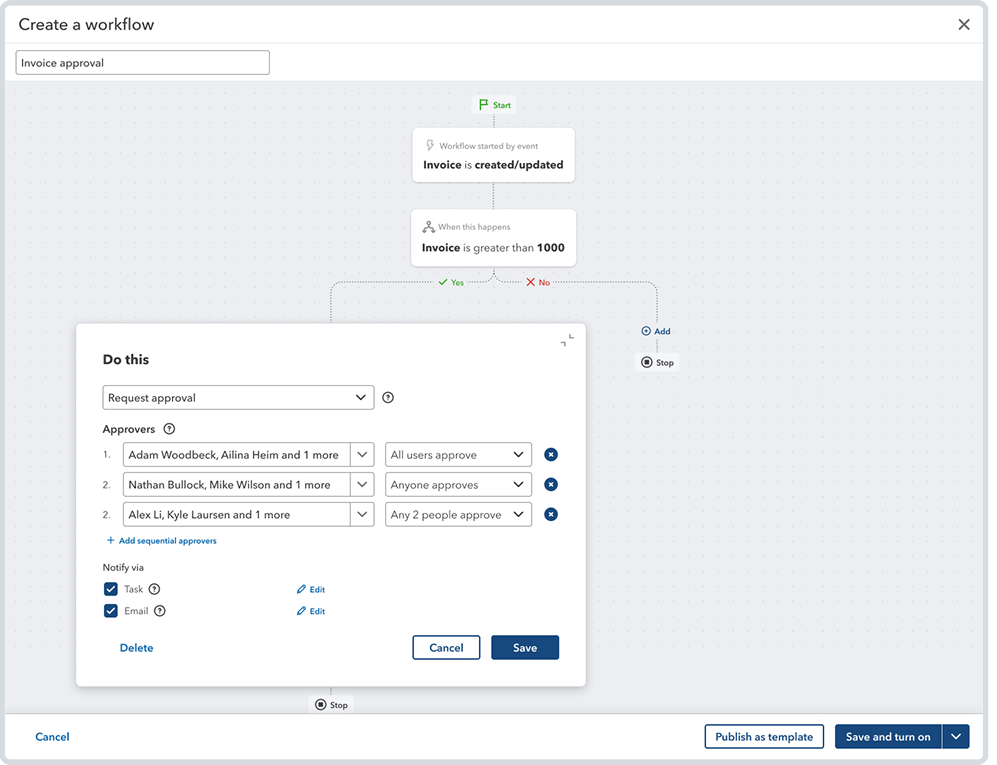
Get more flexibility to create complex workflows by including parallel approvals with up to five approvers in a single step and a minimum approval threshold. Create hybrid workflows combining sequential and parallel steps. For construction: eliminates bottlenecks where one approver holds up PO or invoice processing.
Detailed Audit Trails
Keep your business audit-ready with more detailed audit trails for transaction forms approved through workflows, such as invoices and purchase orders. Shows all approval steps, approver names, statuses, timestamps, and which approvers met criteria. Critical for sureties, banks, and auditors.
Dimensions on Workflow Automation
Help make approvals, reminders, and tasks more efficient by setting dimension-based conditions in workflows to more closely match your business structure and financial reporting requirements. For example, Atlanta division POs route to a different approver than Denver, automatically.
Where we would like to see this go:
We want the ability to set up workflow conditions based on custom project fields. For example, if you add a custom field for Project Manager to a project, you should be able to select that project manager as a workflow approver so vendor invoices automatically route to the PM responsible for that job. Today, workflow routing is limited to dimensions and standard fields. Custom field-based routing would let construction companies build approval workflows that mirror how they actually manage projects, without forcing their org structure into dimension categories it does not fit.
Intuit AI Enhancements
For mid-market customers, Intuit Intelligence delivers AI-powered insights embedded into core business workflows, helping teams better understand and act on their data. For businesses using Intuit Enterprise Suite, Intuit Intelligence extends these capabilities with deeper, cross-entity visibility and enterprise-grade insights across consolidated reporting, advanced accounting, and multi-entity operations.
Sales Tax Agent (Early Access)
Early access availability of Sales Tax Agent now includes a new filing pre-check tool that automatically scans for mismatches between Profit & Loss (P&L) and Sales Tax Liability (STL) reports. Catches discrepancies before they become compliance issues, valuable for contractors operating across multiple states and jurisdictions.
Finance Agent
Get a clear and timely view of your multi-entity organization's financial performance by customizing your monthly performance summary and recommendations, and drilling down from a parent-level view of performance into individual entities as needed. Remove irrelevant KPIs and recommendations, add them back anytime.
Accounting Agent
Review and post transactions more efficiently using AI that scans and analyzes incoming bank feed transactions, matches transaction data like vendors and categories, and groups matches for your review. Significantly reduces transaction categorization time during month-end close for high-volume construction companies.
“By using Intuit Enterprise Suite, I think I've probably picked up 10 to 15 hours a week just by having the systems. Our team has probably picked up 40 to 50 hours a week.”
— Jason Corby, CFO and Owner, HFMM Legacy Group
Inventory and Order Management
Strengthen your inventory and order management workflows with enhancements that help you avoid rework, boost accuracy, and more closely connect sales, inventory, and accounting.
Item Receipt
An item receipt is now the official record of physical goods received in IES, enabling an efficient, modern inventory receive-to-pay workflow. Separates inventory receiving from billing. Item receipts update quantity on hand when goods arrive, support full or partial receipts, and create a clean audit trail with inventory accuracy, financial accuracy, operational efficiency, and supplier accountability. COGS and AP align to actual receipt dates, reducing accrual issues for contractors with materials management.
Moving Average Cost Valuations
When migrating from QuickBooks Desktop, you can now choose to continue using your Moving Average Cost (MAC) valuations instead of switching to FIFO, maintaining the accuracy of your inventory valuations and COGS. Item quantities and average costs carry over, and the cost engine maintains MAC in real time. Removes a major migration friction point.
Sales Order Enhancements
Customize sales orders to fit your workflow and help data remain consistent throughout the order-to-cash process. Sales orders now connect to POs, estimates, and invoices. Customizable order forms, editable column names, document attachments, detailed audit logs, and multi-currency support with automatic home-currency conversion. New reports show open sales orders by item and customer with due dates, quantities invoiced, and quantities backordered.
Dimension Enhancements
Assign dimensions faster and with more flexibility to help streamline your workflow. Dimension assignment now accessible from the Fixed Assets and Business Feed pages in addition to the Dimensions hub. Assign dimensions in bulk to all items. Move transactions to a "Save it for later" list when you are not ready to assign values. Speeds up clean, consistent tagging for construction companies building out dimension frameworks.
Workforce Management
Enhanced features help you simplify work assignments, manage paychecks, and get unified visibility of all W-2 and multi-entity employee information.
Garnishments
QuickBooks Payroll customers can now handle the full garnishment lifecycle in one place with richer context and automated bookkeeping. Associate each garnishment with its agency, view and track garnishment liabilities by employee, mark and track paid garnishments, and auto-sync to books.
Consolidated Employee List
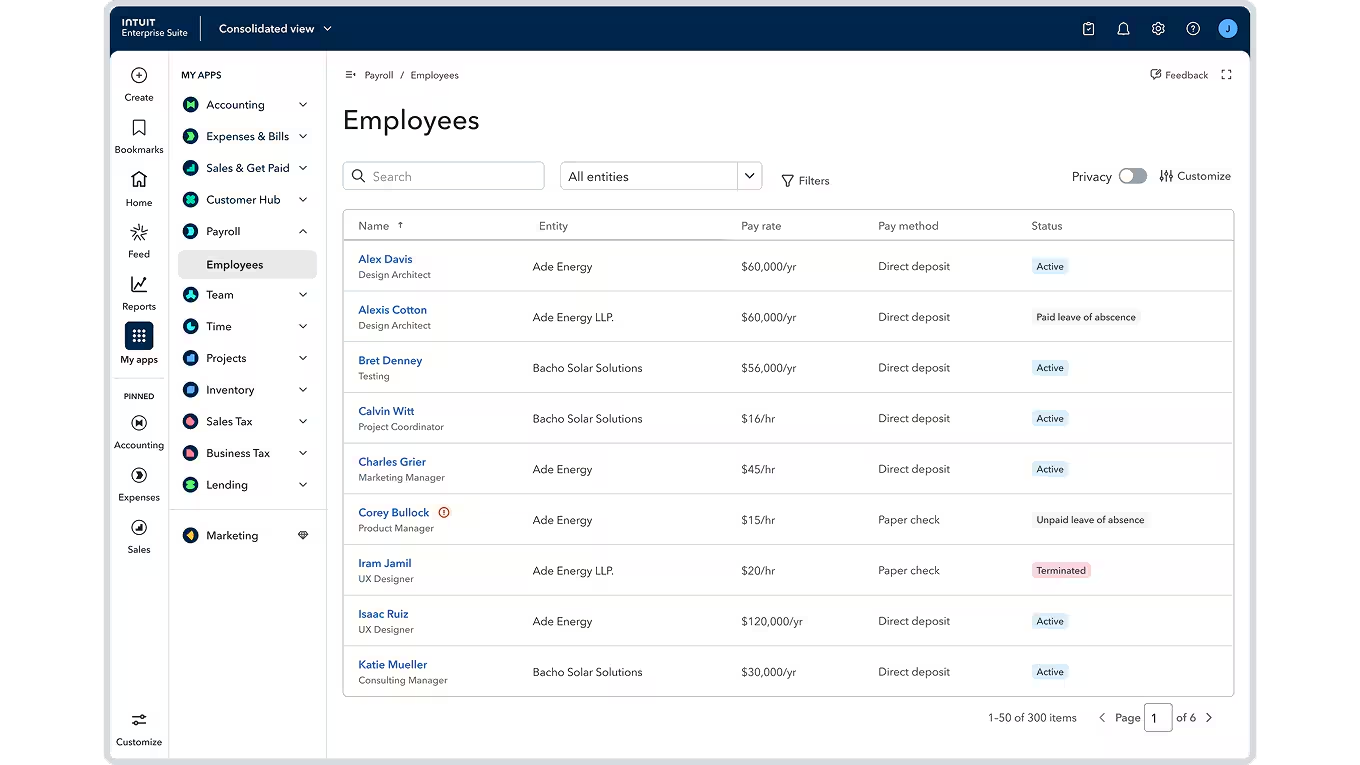
IES customers using QuickBooks Payroll Elite can now streamline workforce management and eliminate repetitive tasks across accounts, with unified visibility of all W-2 and multi-entity employee information. Employees working across multiple entities shown in separate rows with job title, pay rate, pay method, and status. No more switching between entities during onboarding, audits, and year-end.
Assignments in QuickBooks Time
Businesses using Payroll Premium and Elite can manage all assignments in one place to reduce confusion, errors, and rework while improving overall payroll and job-costing accuracy. Assign customers or projects to workers, control visible fields. Cleaner time entries for more accurate labor cost allocation to projects.
How RedHammer Can Help
RedHammer is the nation’s largest construction-only CAS firm and Intuit’s select implementation partner for IES deployments.
- Construction Beta Configuration: Project phases, cost groups, budget structures, AIA invoicing workflows designed to match how your company estimates, builds, and bills.
- Proposal and Change Order Workflows: Connected workflows from proposal to estimate to project to invoice, including negative change order handling and client portal setup.
- Multi-Entity and Reporting: Entity structures, elimination accounts, consolidated reports, and Finance Agent summaries configured for how your business operates.
- Workflow Automation: Parallel approvals, dimension-based routing, and audit trails that match your internal controls and satisfy surety/bank requirements.
- Business Intelligence: Dashboards, KPI scorecards, calculated fields, and management report packages for construction-specific metrics.
- Migration: QuickBooks Desktop to IES with MAC preservation, automatic budget creation, and clean cost group mapping.
- Dimensions and Workforce: Dimension frameworks for job costing, WIP, and consolidation. Time tracking assignments for accurate labor cost allocation.
Frequently Asked Questions
Q. Are the construction features free?
A: Currently in open beta at no additional cost for IES customers. Intuit may introduce fees in the future. For QBO Advanced customers, construction capabilities are a paid add-on. RedHammer offers full Intuit Enterprise Suite Implementation Services to help you configure and deploy these features.
Q. Is the construction beta production-ready?
A: It covers real production workflows including budgeting, invoicing, and change orders, but it is still a beta, so features could change. We recommend piloting with one or two projects before a full rollout. RedHammer’s IES Implementation Services include construction beta evaluation and phased rollout planning.
Q. How does AIA-style invoicing compare to my spreadsheets?
A: IES tracks contract value, invoiced to date, current draw, and remaining balance at the phase level with each invoice building on the last. It eliminates the manual schedule of values spreadsheet and makes the data available in the client portal and as PDFs.
Q. Can I preserve Moving Average Cost when migrating from Desktop?
A: Yes. Item quantities and average costs carry over, and the cost engine maintains MAC in real time across all posting transactions.
Q. Which features should construction companies prioritize?
A: Construction beta (project phases, cost groups, AIA invoicing, enhanced budgets), parallel approval workflows, Accounting Agent for batch processing, and the new consolidated reports for multi-entity visibility. Not sure where to start? RedHammer’s IES Implementation Services team can help you prioritize based on your specific operations.
Q. How do cost groups relate to my cost codes?
A: Cost groups are high-level categories (labor, materials, equipment, subcontractor, miscellaneous) applied to products and services. They work alongside your cost codes as a roll-up level for comparing estimated vs actual by category.
Q. Is this available for QBO Advanced?
A: Yes. Construction capabilities are available as a paid add-on for QBO Advanced customers, giving smaller contractors an entry point without the full IES platform.
Related RedHammer Content
Intuit Enterprise Suite: Construction Edition Is Finally Here
The Complete Guide to (IES) Intuit Enterprise Suite for Construction Companies
Intuit Enterprise Suite Implementation Services
Intuit Enterprise Suite Fall 2025 Updates
QuickBooks Classes vs. IES Dimensions
Sources
1. Intuit Enterprise Suite Winter 2026 Product Release Overview
2. Intuit Launches New AI-Powered Construction Edition (QuickBooks Blog)
4. Intuit Investor Relations Press Release
5. February 2026 Updates in Intuit Enterprise Suite (Release Notes)



.png)


